


Shell: Fuel, Charge & More
3.17.74K Reviews
App Specs
- Version
- 9.5.0
- Updated On
- License
- Free
- Downloads
- 1,000,000+
- Developer
- Shell Information Technology International B.V.
- Categories
- Auto & Vehicles
- Platform
- Android, iOS
Screenshots
 Analysis by AppCompare
When I judge a driving app, I care less about how many things it promises to do than whether it helps at the moment I need it: before a stop, while planning a route, or when I am already at a pump. Shell: Fuel, Charge & More is designed around those everyday decisions, bringing Shell station information, fuel-related tools, charging and rewards into one place. I see its clearest value for drivers who already use Shell locations and want fewer separate steps in their routine.
Quick checks before you set off
Speed expectations matter with an app like this. I would treat it as a way to look up a station or plan a stop before driving, not as a reason to handle a phone while moving. A map can make choosing a nearby location feel straightforward, but the useful part is being able to make that choice in advance. If I am leaving home with a low tank, I can check the route and decide where to stop before traffic or a busy forecourt adds pressure.
Shell Information Technology International B.V. is the developer, and the app is free to download. It sits in the auto and vehicles category, has an Everyone age rating, and has reached over one million installs. Its average rating is 3.2 from around 26,000 ratings, with roughly 7,200 written reviews. I take that middling score as a reminder to judge it by my own needs: a driver who regularly visits Shell stations may get more from it than someone who only wants a general-purpose map.
For an occasional user, the main question is whether one more app is worth keeping on the phone. If Shell is already part of your normal driving routine, having station information and rewards together can make sense. If you usually choose whichever fuel stop is closest or cheapest regardless of brand, a standard maps app may be the simpler option. I would decide based on how often I expect to use the Shell-specific information, rather than installing it just because it has several functions.
Using it when plans get busy
A realistic use case is a weekday drive that runs longer than expected. Before setting off, I can check where a Shell stop fits along the journey, then use the app’s fuel or charging information to make a more deliberate choice. The practical benefit is not that it removes every delay; it is that I can avoid searching from scratch when I am already short on time. I would make the stop decision while parked, then follow the route without trying to interact with the phone on the road.
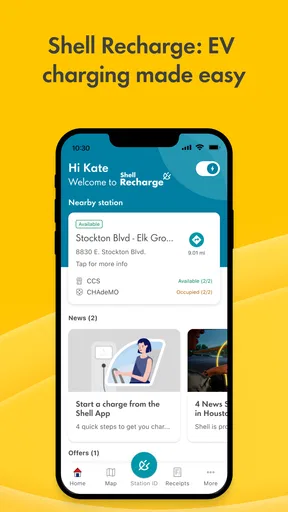
For electric-car drivers, a charging finder has a different kind of value from a fuel-station search. A location on a map is a starting point for planning, not a guarantee that a charger will suit every vehicle or be ready when you arrive. I would check the details shown in the app before setting out and keep a backup option in mind on a longer trip. That small bit of planning matters most when there is little flexibility in the route.
Busy periods can expose the limits of any all-in-one driving app. Searching for a location, comparing choices and sorting out a payment or reward while other people are waiting is a poor time to learn where a control lives. My practical tip is to explore the relevant screens at home or while parked, and to set up whatever account or payment steps the app asks for before relying on it at a station. That turns a potentially awkward forecourt task into a short, familiar routine.
Worth Reading Before You Choose

EA SPORTS FC Mobile 26 Is a Bigger Football Game, but It Takes Time

Flipboard Shows What News Apps Must Do Beyond the Feed

Switching to Android Auto Means Rethinking Your Driving Routine

Google Calendar Makes a Crowded Week Easier to Manage

Ludo King Makes the Most of the Minutes Between Plans

Baby Panda World Brings Quick Play to Modern Phones, but Its Game Library Feels Busy
Reliability means having a fallback
I would not make the app my only plan for finding fuel or a charger. It is useful as a Shell-focused companion, but drivers sometimes need a broader view of nearby options, especially when a preferred location is inconvenient. A general navigation app can be better for comparing places across different brands, while Shell’s own app makes more sense when I specifically want to use Shell services and keep related tools together.
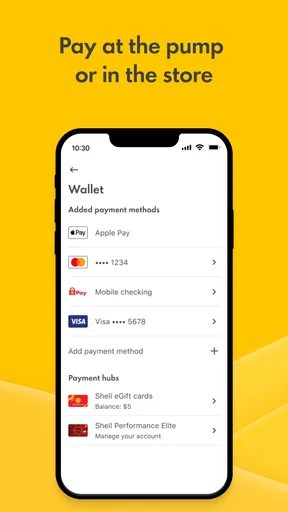
The same distinction applies to payment. Paying without leaving the car can be convenient when the app and station support the process, but I would still carry a usual payment method and be ready to use the station’s normal option if the app does not work as expected. Keeping a fallback is not a criticism of this particular app; it is sensible preparation for any phone-based payment flow, especially when I am travelling or in a hurry.
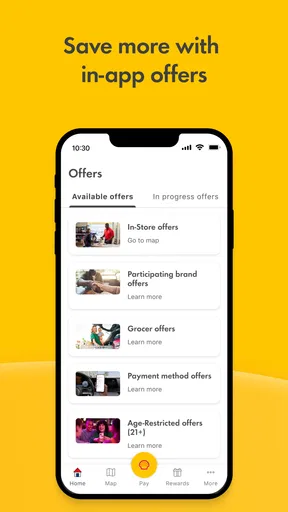
Rewards can make repeated stops feel more worthwhile, but I would check the terms and the available offers in the app rather than assume every purchase earns the same benefit. Promotions can change, and a reward is only useful if it fits something I would buy or use anyway. I would also avoid choosing a less convenient stop solely for a small incentive unless the detour makes sense for my route.
Device fit and everyday trade-offs
The current version is 8.12.0, and the minimum operating-system requirement is Android 7.0. That makes the compatibility question simple for Android users: check the phone’s software version before trying to install it. The listed age rating is Everyone, so it is not presented as an adults-only app. As with any map-based tool, a working connection and usable location information are important to getting practical value from it; I would check the phone’s settings and connection if a location search does not behave as expected.
I would also be selective about how much I ask the app to do during a drive. Looking up stops before departure is a calmer workflow than repeatedly opening maps, offers and payment screens on the road. If I am travelling with someone else, they can handle a search while I focus on driving; alone, I would pull over before using the phone. The app’s convenience should support safer habits, not tempt me to multitask behind the wheel.
Resource demands are hard to judge from feature descriptions alone, so I would not assume that a map-heavy session has no effect on battery or mobile data. For a long trip, a sensible routine is to plan the route while the phone is charged, avoid leaving navigation or search screens running when they are no longer needed, and keep an ordinary navigation alternative available. These are modest precautions, but they help if the phone is older or already low on power.
Who gets the most from it
I think the app is best suited to drivers who visit Shell often enough to care about Shell locations, fuel-related convenience and rewards in the same place. It can also help EV drivers who want a dedicated way to look for charging points associated with Shell, provided they treat the result as part of a plan rather than a promise that a particular charger will fit their needs. Occasional drivers may still find it useful, but they have less reason to keep it open regularly.
It is less compelling if your priority is comparing every nearby fuel brand, finding the lowest price regardless of operator, or using one neutral map for all travel needs. In those cases, a general navigation or fuel-comparison tool may suit you better. I would not install this expecting it to replace every driving app; its advantage is its Shell focus, and that focus is also the reason it will not be equally useful to every motorist.
For someone deciding whether to try it, the low-commitment approach is to install it, check whether the nearby locations and offers match the way they actually travel, and keep it only if those details save time or make a regular stop easier. The download is free, but the real cost is attention: another app to maintain and learn. If the Shell-specific tools earn their place in your routine, that trade-off is reasonable. If not, your existing map may already do enough.
What’s Inside the App?
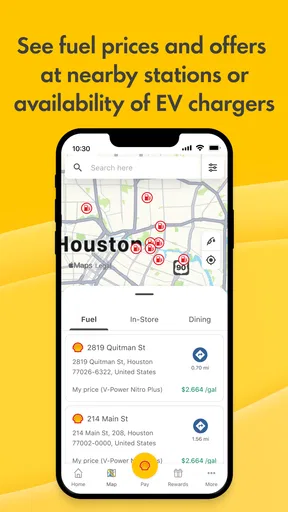
First things first, Shell: Fuel, Charge & More isn’t just a run-of-the-mill app for finding gas stations. It’s packed with features that make it super useful. You can locate the nearest Shell stations, check fuel prices, and even pay for your gas without leaving your car. How cool is that?
The app also caters to electric vehicle owners with its charging station finder. This is a game-changer if you’re on a road trip or just need a quick charge in the city. The app helps you find available charging spots, so you’re never left stranded.
Smooth Navigation and User-Friendly Interface
One of the first things I noticed was how intuitive the app is. The layout is clean, and everything is right where you’d expect it to be. No fumbling around trying to figure out where to go. Just a few taps and you’re set. Plus, the map integration is seamless. You can easily toggle between gas stations and charging points with a simple swipe.
Rewards and More
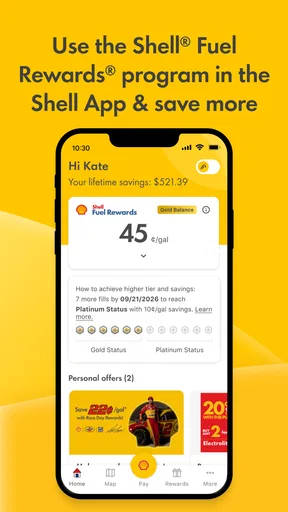
Now, onto one of my favorite parts: the rewards. Who doesn’t love earning points for things they’re already doing? With Shell’s rewards program, you can earn points every time you fuel up or charge your vehicle. These points can be redeemed for discounts or even free products. It’s like getting a little bonus just for keeping your tank full.
And it doesn’t stop there. The app also offers special promotions and deals, which are updated regularly. So, you’ll want to keep checking back to see what’s new. It’s a smart way to save some cash while still getting quality fuel and services.
Final Thoughts
All in all, Shell: Fuel, Charge & More is a solid app that brings a lot of convenience to the table. Whether you’re a traditional car owner or have made the switch to electric, this app covers all bases. It’s user-friendly, packed with useful features, and even throws in some rewards to sweeten the deal.
If you’re someone who appreciates convenience and likes to stay ahead of the curve, give this app a try. You might just find it becomes an essential part of your driving routine. Happy fueling and charging!
Pros
- User-friendly interface with intuitive navigation.
- Offers real-time fuel price updates.
- Seamless integration with loyalty programs.
- Supports various payment methods.
- Provides station locator with detailed filters.
Cons
- Limited availability in some regions.
- Occasional slow loading times.
- GPS tracking can drain battery quickly.
- Some features require account signup.
- In-app ads can be intrusive at times.
FAQs for Shell: Fuel, Charge & More
What features does the Shell: Fuel, Charge & More app offer?
The Shell app offers a range of features including fuel price comparisons, the ability to find the nearest Shell stations, and options to pay for fuel directly through the app. It also includes rewards programs, electric vehicle charging locations, and updates on exclusive promotions and discounts.
Is the Shell app available for both Android and iOS devices?
Yes, the Shell: Fuel, Charge & More app is available for download on both Android and iOS platforms. You can find it on the Google Play Store for Android devices and the Apple App Store for iOS devices, ensuring broad accessibility for users.
How secure is the payment process within the Shell app?
The Shell app employs robust security measures to protect user payment information. It uses encryption and secure payment gateways to ensure that transactions are safe and secure. Users can confidently use the app for fuel payments without worrying about data breaches or fraud.
Can I track my fuel expenses using the Shell app?
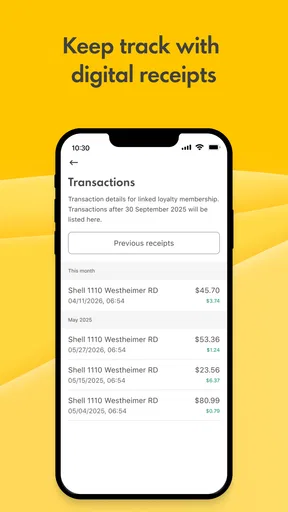
Yes, the Shell app includes features for tracking your fuel expenses. It logs your transactions, allowing you to monitor your spending over time. This feature is particularly useful for budgeting and understanding your fuel consumption patterns.
Does the Shell app offer any loyalty or rewards program?
The Shell app integrates with the Shell Rewards program, offering users points for every purchase made through the app. These points can be redeemed for discounts on future fuel purchases, car washes, and other services, providing added value to regular users.


